

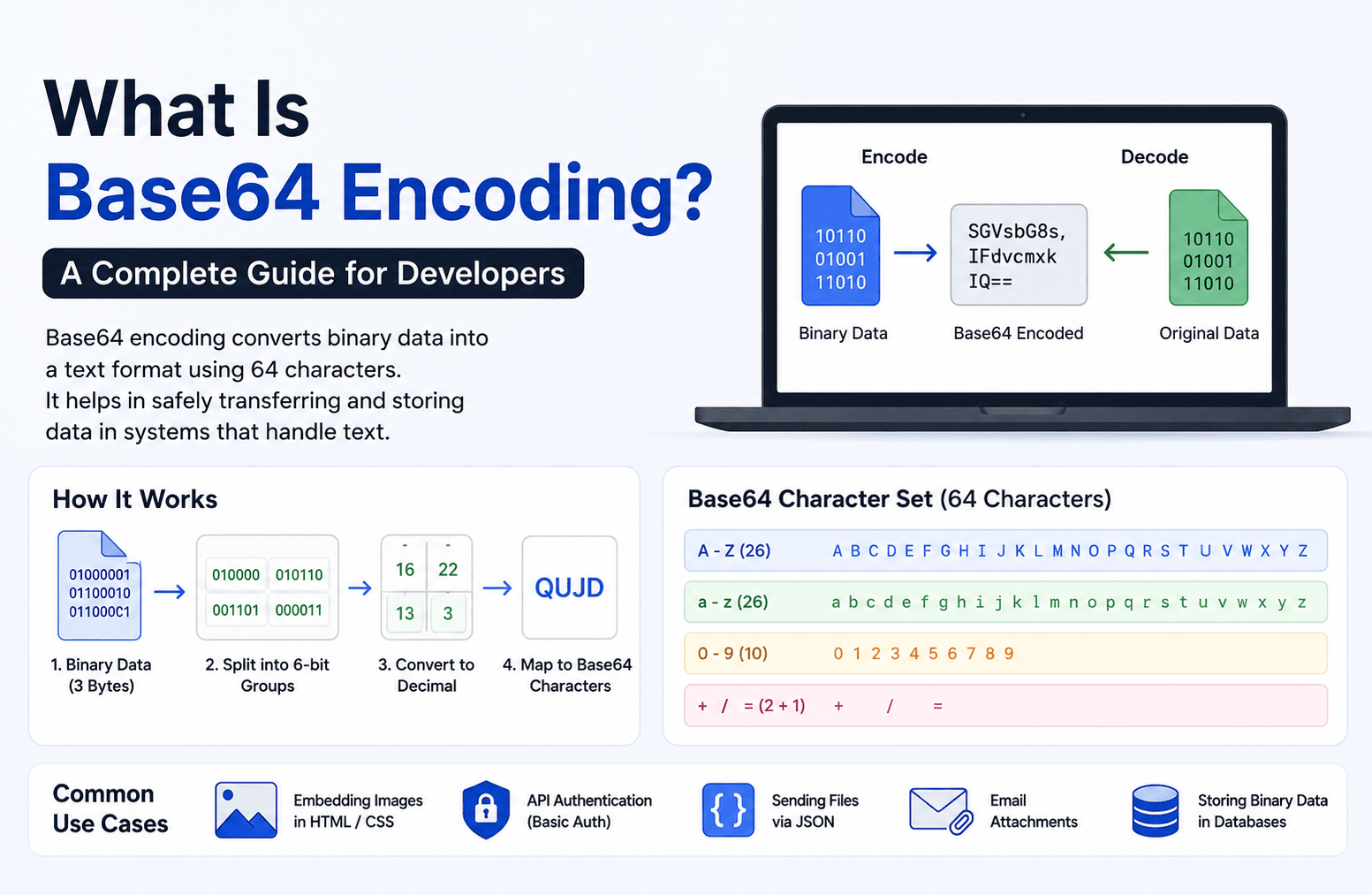
What Is Base64 Encoding?
If you’ve ever worked with APIs, email attachments, JWT tokens, or image uploads, you’ve probably come across Base64 encoding. Even if you don’t notice it, Base64 is used behind the scenes in many applications to transfer and store data safely.
Many developers use Base64 regularly but don’t always know why it’s needed or how it actually works. In this guide, we’ll explain Base64 encoding in simple terms, when you should use it, and when you should avoid it.
Base64 encoding is a way to convert binary data into plain text. Instead of sending data in its original binary form, it changes the data into a set of 64 readable characters.
The Base64 character set includes:
- Uppercase letters (A–Z)
- Lowercase letters (a–z)
- Numbers (0–9)
- The symbols + and /
- The = character, which is used for padding when needed
The main purpose of Base64 is compatibility. Some systems and protocols are designed to work only with text data. Since binary files such as images, PDFs, or videos cannot be transmitted directly through these systems, Base64 converts them into a text format that can be transferred without issues.
After the data reaches its destination, it can easily be decoded back into its original form.
How Does Base64 Encoding Work?
Although the process may sound technical, the basic idea is quite simple.
Base64 reads the original data in blocks of 3 bytes (24 bits). These 24 bits are then divided into four groups of 6 bits. Each 6-bit value matches one character from the Base64 character set, producing four readable characters.
Here’s a quick summary:
- Every 3 bytes of data become 4 Base64 characters.
- If the input data isn’t a multiple of 3 bytes, the output is completed using one or two = padding characters.
- The encoded data becomes about 33% larger than the original file.
For example, when you encode a small image or document, the file size increases slightly because Base64 uses additional characters to represent the same information.
Common Uses of Base64 Encoding
Base64 is used in many everyday development tasks. Here are some of the most common examples.
1. Embedding Images in HTML or CSS
Developers can convert an image into a Base64 string and place it directly inside HTML or CSS using a Data URL.
This removes the need for an extra HTTP request, which can be useful for very small icons or logos.
2. API Authentication
Many APIs use HTTP Basic Authentication, where the username and password are combined and encoded using Base64 before being sent in the Authorization header.
Keep in mind that this is encoding, not encryption, so it should always be used over HTTPS.
3. Sending Files Through JSON
JSON supports text but not binary data.
When an application needs to send images, PDFs, or other files inside a JSON request, those files are first converted into Base64 strings. The receiving application then decodes the string back into the original file.
4. Email Attachments
Email systems use the MIME standard to send attachments.
Since emails were originally designed for text, attachments are encoded in Base64 before being delivered. This allows documents, images, and other files to travel safely through email servers.
5. Storing Binary Data
Some databases or storage systems work better with text than binary files.
In these situations, developers may store images or other binary content as Base64 strings. While this increases storage size, it can simplify data handling in certain applications.
Frequently Asked Questions
Q: Is base64 encoding the same as encryption?
A: No. Base64 encoding is a data format conversion, not a security mechanism. It converts binary to ASCII text so it can be safely transmitted through text-based systems. Anyone can decode it instantly. For security, always use proper encryption algorithms.
Q: Why does base64 output end with == or =?
A: Base64 works in groups of 3 bytes. When the input is not divisible by 3, padding characters (=) are added to complete the final group. Two = signs mean one byte of real data in the last group; one = sign means two bytes.
Q: Does base64 increase file size?
A: Yes. Base64 encoded output is approximately 33% larger than the original binary data. Keep this in mind when embedding large images in HTML or passing large files through APIs, as it adds overhead to your payload size.
Q: Can I use base64 in a URL?
A: Standard base64 uses + and / characters, which have special meaning in URLs. For URL-safe encoding, use the base64url variant, which replaces + with – and / with _. Most modern libraries and online tools offer a URL-safe option.
Q: What is the difference between base64 encode and decode?
A: Encoding converts raw binary or text data into a base64 string. Decoding reverses that process and retrieves the original data. You encode before sending or storing data, and decode when you receive or read it.